Hiển thị các bài đăng có nhãn Code Blogger Template. Hiển thị tất cả bài đăng

Thứ Bảy, 21 tháng 7, 2012

Boulevard Blogger Template


DemoDownload
Template name : Boulevard

Template features : Wordpress Look, 3 Columns, 4 Columns Footer, Right Sidebar, Magazine, Header Banner, Featured Content Slider, Fixed Width, Clean Design, Gray Background, Tabbed Widget, Top Navigation Menu.

Release date : June 2012

Author :  www.soratemplates.com

Designer :  themesector.com

Basic Instructions : How to install a Blogger Template
Configure Featured Content Slider:
Login to blogger dashboard --> layout --> Edit HTML. Now scroll down to where you see the codes below:
  • <div id='featured-wrapper'>
    <div class='slider'>
    <a href='#'><img src='/image.jpg' title='#htmlcaption_66'/></a>
    </div>
    ..........
    <div class='slider-text nivo-html-caption' id='htmlcaption_66'>
    <div class='slider-heading'>
    <h2><a href='#'>Battlefield 3 multiplayer review</a></h2>
    <p>Lorem ipsum dolor sit amet...</p>
    </div>
    </div>
    ..........
Now replace:
  • "#" with your featured post URL.
  • "image.jpg" with your slider image

Configure Dropdown Menu:
Login to blogger dashboard --> layout --> Edit HTML. Now scroll down to where you see the codes below:
  • <div id='navigation'>
    <ul class='menu' id='menu-main'>
    <li><a href='#'>Home</a>
    <ul class='sub-menu'>
    <li><a href='#'>Blog Style</a></li>
    ..........
Just replace "#" with your menu item URL.
How To Change Header Banner:
find this:
  • <div id='header-banner'>
    <a href='#'><img src='/header-banner.jpg'/></a>
    </div>
Now replace:
  • "#" with your banner URL.
  • "header-banner.jpg" with your banner image.

How To Change Tab Names of Tab Widget:
find this:
  • <ul class='tabs'>
    <li class='active'><a href='#tab1'>Popular</a></li>
    <li><a href='#tab2'>Comments</a></li>
    <li><a href='#tab3'>Tags</a></li>
    </ul>
Change the names "Popular", "Comments" and "Tags" as you like.
Configure Page Navigation Widget:
search for:
  • var pages=4, // Number of posts in each page
    num=2, // Number of buttons will display

0

Tarnished Blogger Template


Tarnished Blogger Template


DemoDownload
Template name : Boulevard

Template features : Wordpress Look, 3 Columns, 4 Columns Footer, Right Sidebar, Magazine, Header Banner, Featured Content Slider, Fixed Width, Clean Design, Gray Background, Tabbed Widget, Top Navigation Menu.

Release date : June 2012

Author :  www.soratemplates.com

Designer :  themesector.com

Basic Instructions : How to install a Blogger Template
Configure Featured Content Slider:
Login to blogger dashboard --> layout --> Edit HTML. Now scroll down to where you see the codes below:
  • <div id='featured-wrapper'>
    <div class='slider'>
    <a href='#'><img src='/image.jpg' title='#htmlcaption_66'/></a>
    </div>
    ..........
    <div class='slider-text nivo-html-caption' id='htmlcaption_66'>
    <div class='slider-heading'>
    <h2><a href='#'>Battlefield 3 multiplayer review</a></h2>
    <p>Lorem ipsum dolor sit amet...</p>
    </div>
    </div>
    ..........
Now replace:
  • "#" with your featured post URL.
  • "image.jpg" with your slider image

Configure Dropdown Menu:
Login to blogger dashboard --> layout --> Edit HTML. Now scroll down to where you see the codes below:
  • <div id='navigation'>
    <ul class='menu' id='menu-main'>
    <li><a href='#'>Home</a>
    <ul class='sub-menu'>
    <li><a href='#'>Blog Style</a></li>
    ..........
Just replace "#" with your menu item URL.
How To Change Header Banner:
find this:
  • <div id='header-banner'>
    <a href='#'><img src='/header-banner.jpg'/></a>
    </div>
Now replace:
  • "#" with your banner URL.
  • "header-banner.jpg" with your banner image.

How To Change Tab Names of Tab Widget:
find this:
  • <ul class='tabs'>
    <li class='active'><a href='#tab1'>Popular</a></li>
    <li><a href='#tab2'>Comments</a></li>
    <li><a href='#tab3'>Tags</a></li>
    </ul>
Change the names "Popular", "Comments" and "Tags" as you like.
Configure Page Navigation Widget:
search for:
  • var pages=4, // Number of posts in each page
    num=2, // Number of buttons will display

0

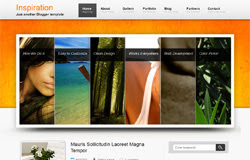
Inspiration Blogger Template


Inspiration Blogger Template


DemoDownload
Template name : Inspiration

Template features : Wordpress Look, 2 Columns, 3 Columns Footer, Right Sidebar, Header Banner, Featured Content Slider, Fixed Width, Gray Background, Tabbed Widget, Top Navigation Menu, Page Navigation.

Release date : July 2012

Author :  www.soratemplates.com

Designer :  csscollector.com

Basic Instructions : How to install a Blogger Template
Configure Featured Content Slider:
Login to blogger dashboard --> layout --> Edit HTML. Now scroll down to where you see the codes below:
  • <ul class='kwick'>
    <li style='width:158.666666667px'>
    <a href='#'><img class='attachment-slider_accordion' height='392' src='/image.jpg' width='952'/></a>
    <p class='slide_title'><b class='slider_title'>How We Do It</b></p>
    <div class='slide_caption'><b class='slider_title'>How We Do It</b><p>Lorem ipsum dolor sit amet...</p>
    </div>
    </li>
    ..........
Now replace:
  • "#" with your featured post URL.
  • "image.jpg" with your slider image

Configure Dropdown Menu:
Login to blogger dashboard --> layout --> Edit HTML. Now scroll down to where you see the codes below:
  • <div id='menu'>
    <ul class='smoothmenu'>
    <li class='current-menu-item'>
    <span class='menuslide'/>
    <a href='#' title='Home'>Home<span class='menu_description'>Beginning</span></a>
    <ul>
    <li><a href='#' title='Accordion Slider'>Accordion Slider</a></li>
    ..........
Just replace "#" with your menu item URL.
How To Change Tab Names of Tab Widget:
find this:
  • <ul class='tab-items'>
    <li><a href='#tabs-1' title='Popular'>Popular</a></li>
    <li><a href='#tabs-2' title='Recent'>Recent</a></li>
    <li><a href='#tabs-3' title='Comments'>Comments</a></li>
    </ul>
Change the names "Popular", "Recent" and "Comments" as you like.
Configure Page Navigation Widget:
search for:
  • var pages=4, // Number of posts in each page
    num=2, // Number of buttons will display

How to change Author Information:
search for:
  • <div id='bio'>
    <img class='avatar' height='80' src='/avatar.gif' width='80'/>
    <div class='bio_info'>
    <h3>About the author</h3>
    <span>admin had written...</span>
    <p>Donec accumsan malesuada orcidonec...</p>
    </div>

0

LeetPress Blogger Template

www.vn-full.com

Template name : LeetPress

Template features : Wordpress Look, 2 Columns, 4 Columns Footer, Right Sidebar, Elegant, Magazine, Featured Content Slider, Fixed Width, Gray Background, Header Banner, Top Navigation Menu, Page Navigation.

Release date : July 2012

Author :  www.soratemplates.com

Designer :  wpmaniac.com

Basic Instructions : How to install a Blogger Template
Configure Featured Content Slider:
Login to blogger dashboard --> layout --> Edit HTML. Now scroll down to where you see the codes below:
  • <div class='sliderContent'>
    <div class='featured-item' style='background:#000 url(/image.jpg) no-repeat center; height:280px;'>
    <div class='featured-inner'>
    <div class='featured-arrows'/>
    <h1><a href='#'>Dead Space 2 Review</a></h1>
    </div>
    </div>
    ..........
Now replace:
  • "#" with your featured post URL.
  • "image.jpg" with your slider image.

Configure Dropdown Menu:
Login to blogger dashboard --> layout --> Edit HTML. Now scroll down to where you see the codes below:
  • <div id='navigation-wrapper'> 
    <ul id='navigate'>
    <li><a href='#'>Home</a></li>
    <li><a href='#'>News</a>
    <ul class='sub-menu'>
    <li><a href='#'>Xbox 360</a></li>
    ..........
Just replace "#" with your menu item URL.
How To Change Header Banner:
find this:
  • <div id='header-banner'>
    <a href='#' target='_blank'><img alt='banner' src='/banner.png'/></a>
    </div>
Now replace:
  • "#" with your banner URL.
  • "banner.png" with your banner image.

Configure Page Navigation Widget:
search for:
  • var pages=4, // Number of posts in each page
    num=2, // Number of buttons will display

How to change Author Information:
search for:
  • <div id='about-author'>
    <img height='75' src='/author.png' width='75'/>
    <h5><strong>Author:</strong> admin</h5>
    <div class='author-descrip'>Lorem ipsum dolor sit amet...</div>
    </div>

0